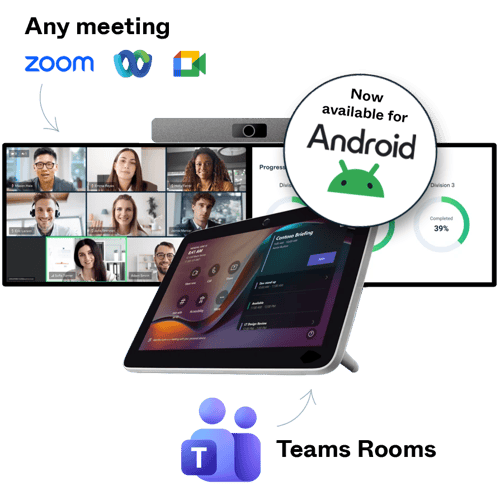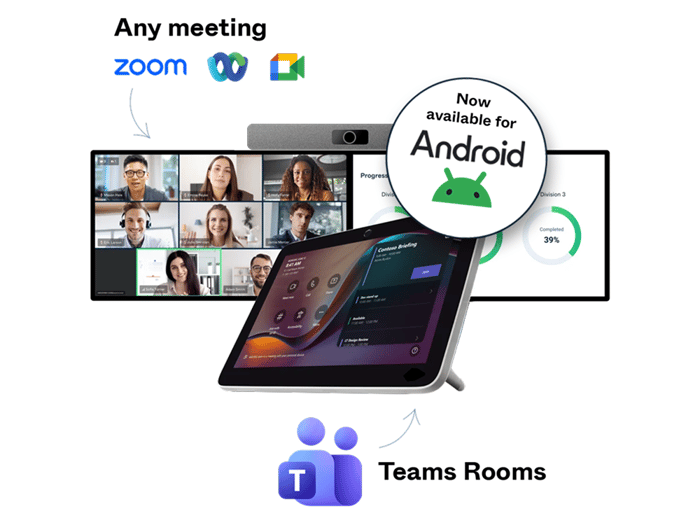


Cross-platform meetings via SIP are now available for Microsoft Teams Rooms on Android.
At a glance:
- Pexip Connect is now available for Microsoft Teams Rooms on Android.
- Pexip provides features not available through Direct Guest Join, including HDMI content sharing, dual screen support, and up to 1080p video quality.
- Manage both Windows and Android Teams Rooms through one interoperability solution, complete with analytics and reporting.
What's new?
Organizations can now get Pexip Connect for Microsoft Teams Rooms on their Android-based devices, providing a premium experience when they join Zoom, Webex, Google Meet, and other third-party meetings from their Teams Rooms.
For organizations with mixed room environments, this closes a long-standing interoperability gap. Whether your meeting rooms run Windows or Android, users can now join external meetings through the same familiar workflow, helping reduce complexity for both employees and IT support.
Enterprise-grade: What Pexip Connect gives you beyond Direct Guest Join
Microsoft Teams Rooms uses Direct Guest Join (DGJ) for joining selected third-party meeting platforms, but that only gets you into the meeting. Pexip Connect for Teams Rooms adds what DGJ doesn’t include and provides a improved experience once inside the meeting.
Besides, Pexip adds a whole-new view for the administrator with detailed call and meeting observability and analytics, so they can provide enterprise-grade support to their users.
This table highlights some of the key differences.
| Pexip | Direct Guest Join | |
| Content sharing | ✅ |  |
| Dual screen support | ✅ | |
| Lobby bypass | ✅ | |
| Centralized observability | ✅ | |
| Video quality | Up to 1080p | Up to 720p |
| In-room AV controls | ✅ | Limited |
| Meeting controls | ✅
|
Partial |
Everything you get with Pexip Connect
With Pexip Connect for Teams Rooms, Android devices benefit from many of the same meeting experiences available across supported Teams Rooms environments, including:
- In-room HDMI content sharing
- Full support for dual screen systems
- Up to 1080p Full HD video quality
- Enhanced analytics and reporting through Pexip Control Center
- One-touch join to virtually any meeting from the Teams Room touch console
- Join third-party meetings such as Zoom, Webex, and Google Meet
- Support for room audio and video devices
See a demo video of Pexip Connect for Teams Rooms on Android here.
Available now
Android support is rolling out now. Organizations already using Pexip Connect for Teams Rooms on Windows can start extending their deployment strategy to include Teams Rooms on Android.
If your organization runs a mixed room environment, or you've been waiting to extend interoperability to the Android devices, you can get started today.
Check out this interactive demo to compare Pexip's experience to Direct Guest Join, and contact us if you're ready to get started.
Frequently asked questions
Can Microsoft Teams Rooms on Android join Zoom meetings?
Yes. With Pexip Connect for Teams Rooms, supported Android Teams Rooms can join Zoom meetings through a consistent room experience.
Can Microsoft Teams Rooms on Android join Webex meetings?
Yes. Pexip Connect for Teams Rooms enables Android Teams Rooms to join Webex meetings.
Can Microsoft Teams Rooms on Android join Google Meet meetings?
Yes. Organizations can use Pexip Connect for Teams Rooms to join Google Meet meetings from supported Android Teams Rooms devices.
Do I need different interoperability solutions for Windows and Android Teams Rooms?
No. Pexip Connect for Teams Rooms now supports both Windows and Android Teams Rooms, helping organizations simplify interoperability across mixed room environments.
Which features are available on Microsoft Teams Rooms on Android?
Available features include one-touch join workflows, cross-platform meeting access, and a consistent room experience when joining supported third-party meeting platforms. Specific capabilities may vary depending on the room system and meeting provider.
Why should I choose Pexip instead of Direct Guest Join?
Direct Guest Join might work for your organization’s basic interop needs, but it lacks features. Pexip Connect is built for organizations that need a more consistent experience across Windows and Android Teams Rooms, with added visibility, management, and reporting.
How can I monitor and manage my Teams Rooms interoperability deployment?
Pexip Control Center gives IT teams insight into room activity, adoption, meeting quality, and usage across third-party meeting platforms.
Which manufacturer devices are supported?
Pexip Connect supports certified Microsoft Teams Rooms devices from leading manufacturers, such as HP Poly, Logitech, MAXHUB, and more. Contact Pexip for the latest supported device list.
How is it priced?
Pexip Connect is licensed per room, per month.
How do I buy?
You can buy directly from Pexip, through authorized channel partners, or via digital marketplaces such as Microsoft Azure Marketplace, which may help eligible customers use MACC spend.
Is Pexip Connect supported by Microsoft?
Yes. Pexip Connect is built on Microsoft-certified interoperability technology, carries Microsoft’s Certified Software designation, and is developed by Pexip as a long-standing Microsoft partner.
- Teams Rooms interop
- Connect